
One health record.
Four ways in.
MEDIQ puts a person’s records, care, appointments and payments in one place — and gives the clinicians treating them the same picture, at the same moment, with an assistant that explains it to both.
- Discipline
- Product design & build
- Platform
- Responsive web application
- Surfaces
- Four, on one record
- Intelligence
- Mediq AI, in every surface
- Built in
- 21 days
Everyone in your care, reading the same page.
MEDIQ is a healthcare platform built around a single idea: everyone involved in a person’s care should be looking at the same record.
Today that record is split. The patient keeps a folder of paperwork, the clinic runs one system, the laboratory another, the insurer a third. Nobody holds the whole picture — least of all the patient, the one person present at every appointment.
MEDIQ closes that gap with four connected surfaces on one record, and an assistant that reads the record back to you in plain language wherever you happen to be standing in it.
Healthcare data is everywhere. Understanding is nowhere.
The information already exists. It is written down, filed and stored — just never in one place, and almost never in language the person it describes can act on.
So the work falls to people. Patients carry paperwork between appointments. Clinicians reconstruct six months of history in the minutes before a consultation. Practices chase referrals by phone. Every one of those handovers is a place where care slows down or something gets missed.
Records live in silos
Consultations, tests and prescriptions stay with whoever produced them. No one holds the full history.
Patients are told, not informed
Results arrive as values and abbreviations, with nothing to say what changed or what to do about it.
Clinicians start cold
A file is opened minutes before the appointment, and months of history are read at speed.
Bills arrive without their arithmetic
Totals, insurance deductions and balances land separately, and rarely reconcile in the patient’s head.
Coordination happens by phone
Referrals, repeat tests and follow-ups depend on somebody remembering to make the call.
Providers take weeks to onboard
Getting a practice onto a platform means forms, verification and manual setup before any value arrives.
One record. Four ways in.
If a single record could be shared safely between the people entitled to see it, most of that friction disappears on its own. The patient stops carrying paper. The clinician stops reconstructing. The practice stops phoning.
The opportunity was never another portal. It was one record, four ways into it, and an assistant that reads it for whoever is looking.
Patient portal
Your record, your care journey, your appointments and everything you owe — in one place, explained.
Clinician workspace
The day ahead, the patient in front of you, and a brief that has already read the file.
Provider network
Onboarding, profiles, staff and per-location performance for clinics, labs, pharmacies and imaging centres.
Hospital command centre
The operational view across a whole institution, reached from the same navigation as the rest.
Not shown in this case study
Mediq AI is not a chat window bolted to the side.
It sits inside the screen you are already on. On the record it says what changed. On a bill it explains the charge. On a clinician’s morning it flags the three patients who will probably need longer.
And it shows its working. Summaries cite the consultations and results they were drawn from, and nothing an assistant drafts — a provider profile, a clinical note — is published until a person confirms it.
Explains
Results, records and charges, in the language the reader actually uses.
Prepares
A patient brief before the consultation; a next step before the appointment.
Drafts
Notes, profiles and instructions — always for review, never published unseen.
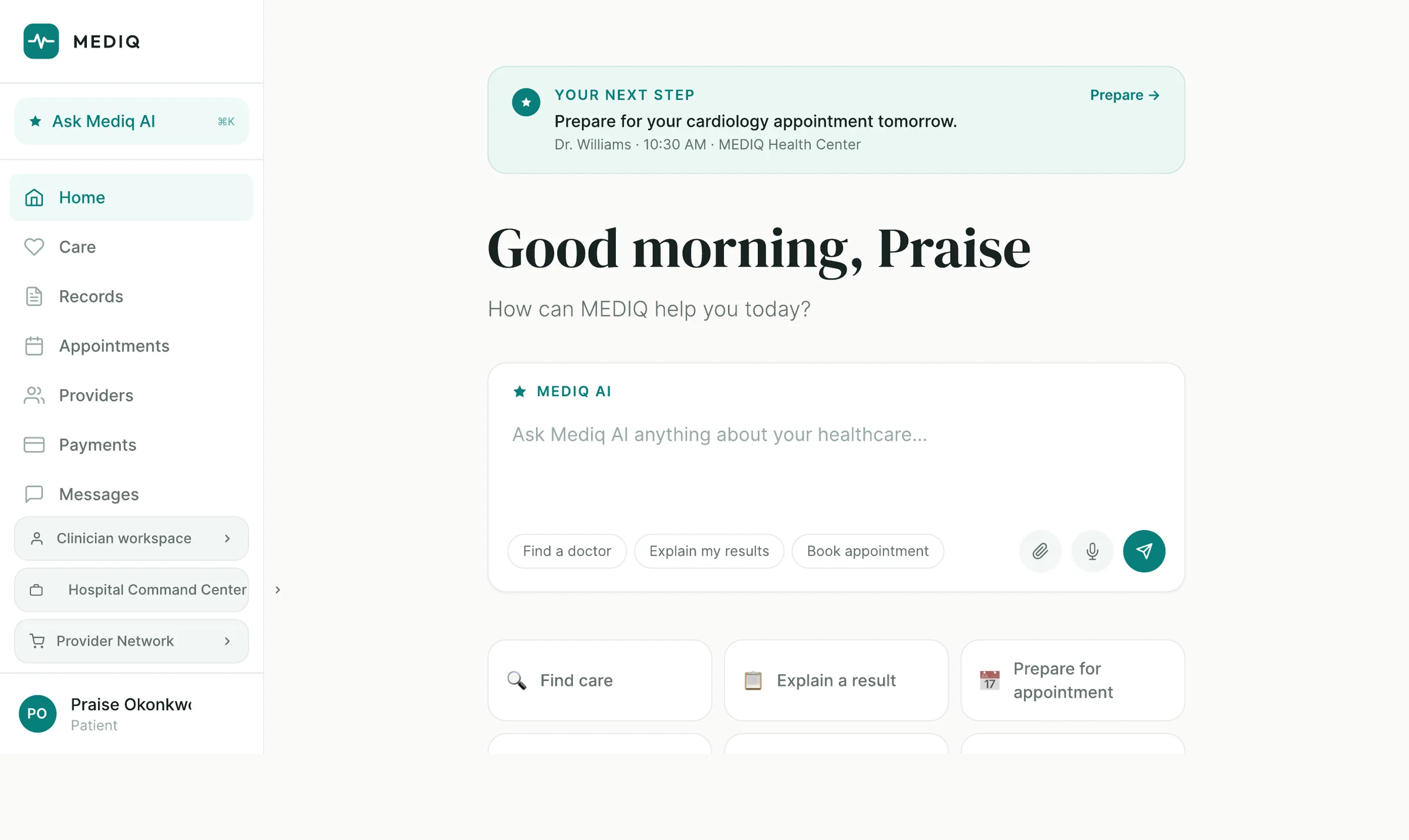
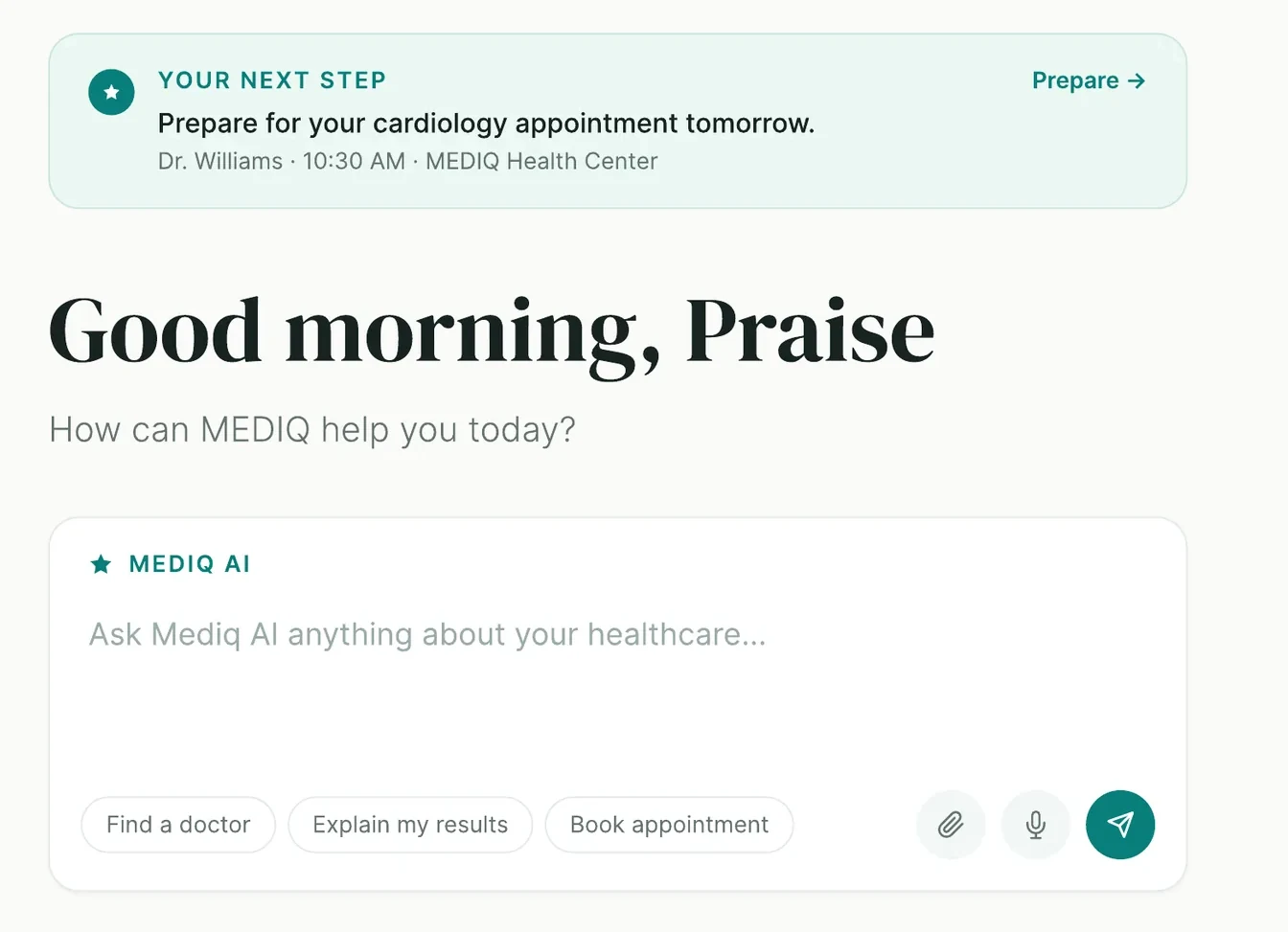
It opens on what to do next.
Most health apps open on a dashboard. MEDIQ opens on a sentence: prepare for your cardiology appointment tomorrow. Everything else — the record, the results, the bills — is one line below it.
Under the greeting sits the ask box. Not a support widget in the corner; the primary control on the screen, with the three questions people actually arrive with already written into it.
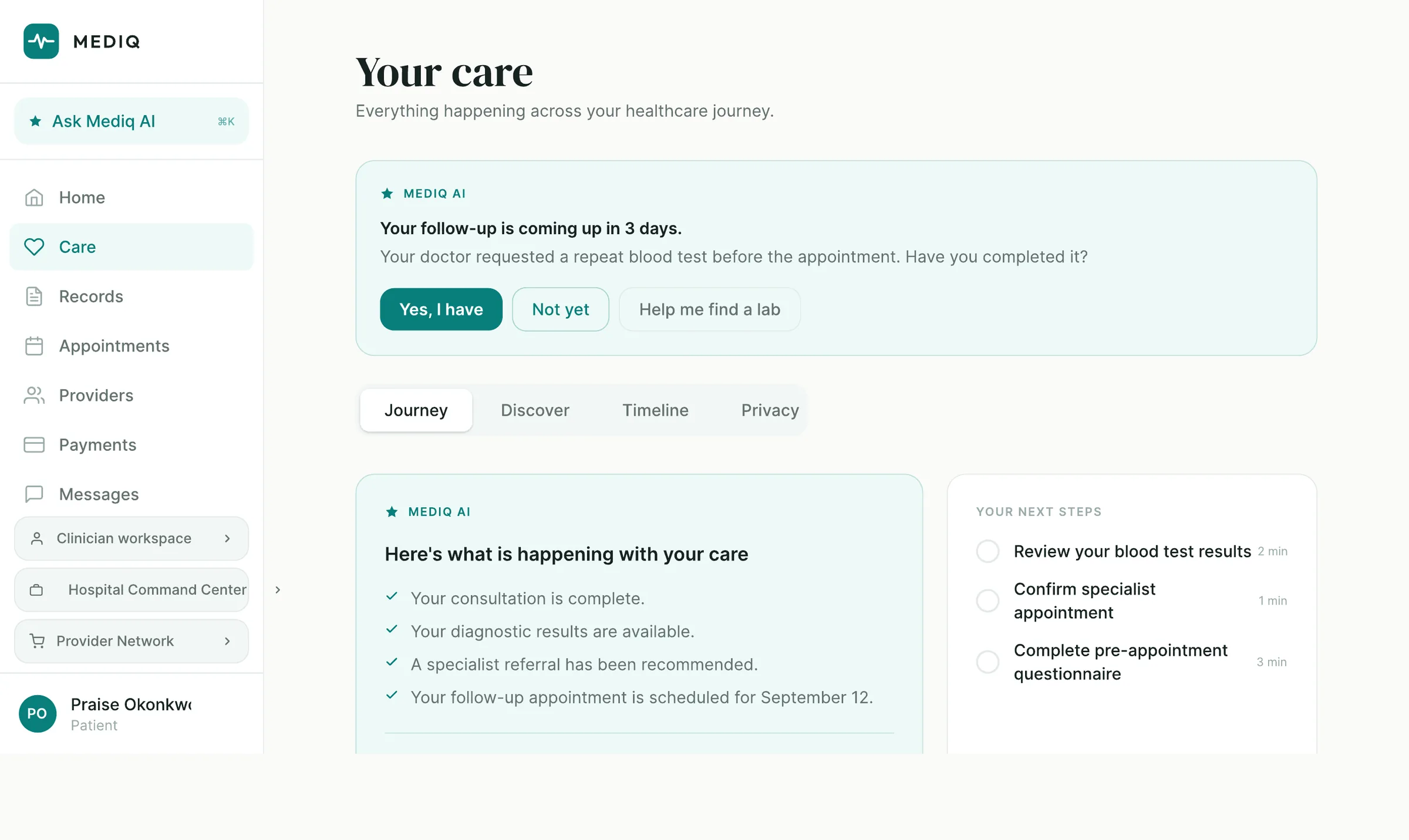
Care as a thread, not a list of appointments.
A course of care is a sequence — consultation, test, result, referral, follow-up — and it only makes sense read in order. The Journey view keeps that thread intact and marks where along it you are.
When the thread needs something from the patient, MEDIQ asks for it directly and offers a way to do it. Not a notification. A question with buttons.
- Journey, Discover, Timeline and Privacy as four readings of one record
- Next steps carry a time cost, so the small ones get done
- Every prompt offers an out — “Not yet” is a first-class answer
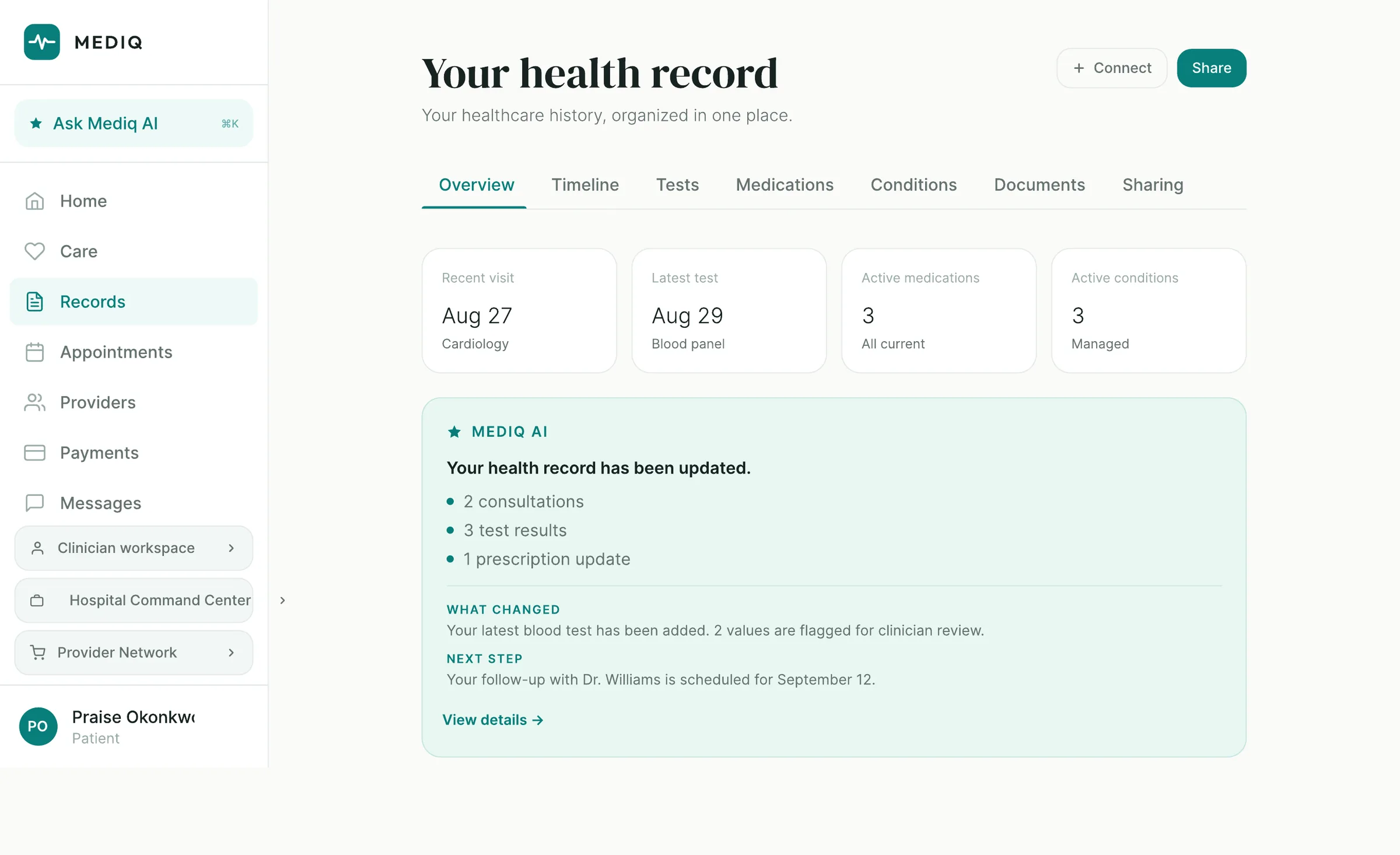
The whole history — and, above it, what changed.
The record holds everything: timeline, tests, medications, conditions, documents and who it has been shared with. Four tiles across the top answer the questions people open it for.
Then the part that matters. Rather than leaving a patient to diff two blood panels, MEDIQ states what changed, which values are flagged for clinician review, and what happens next.
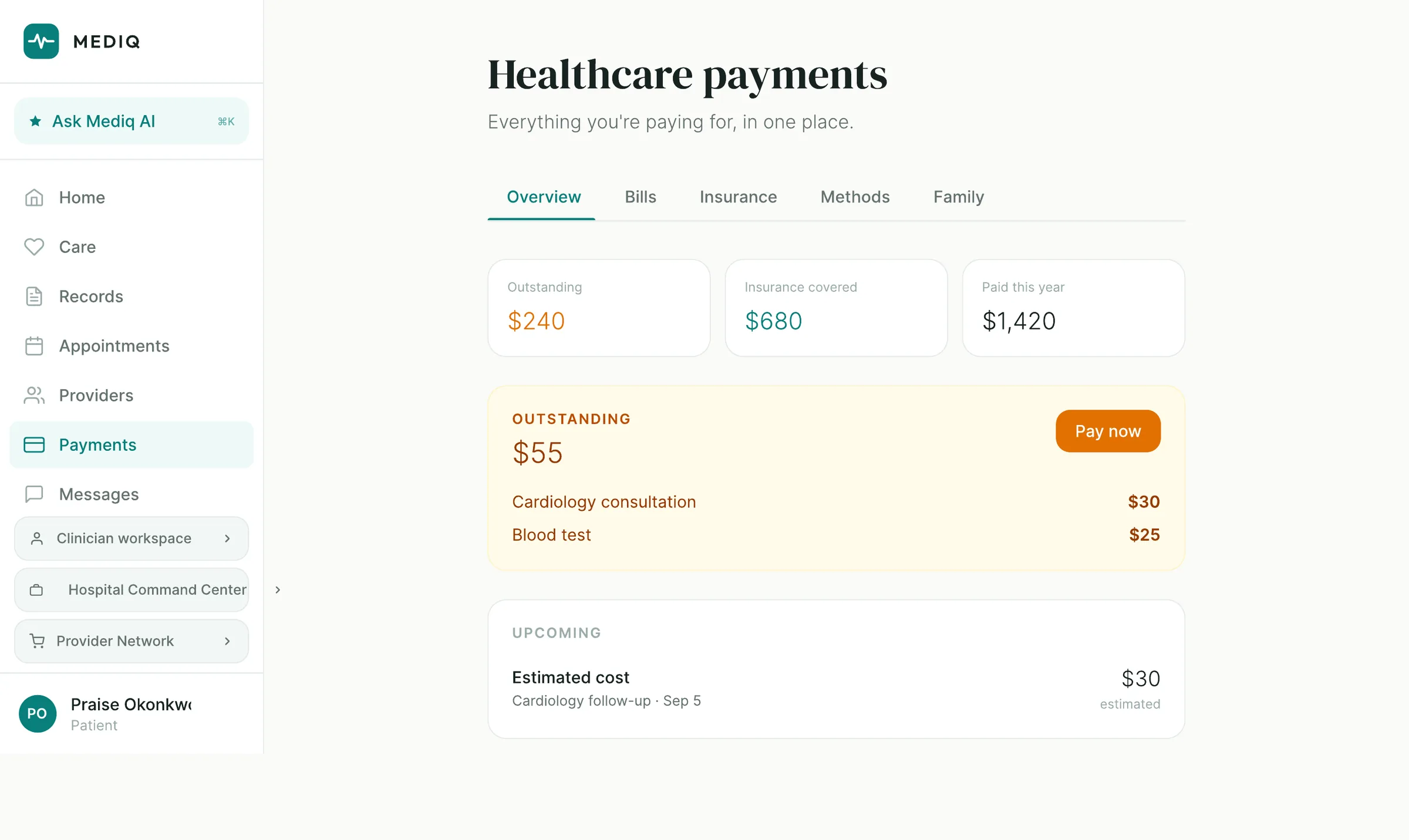
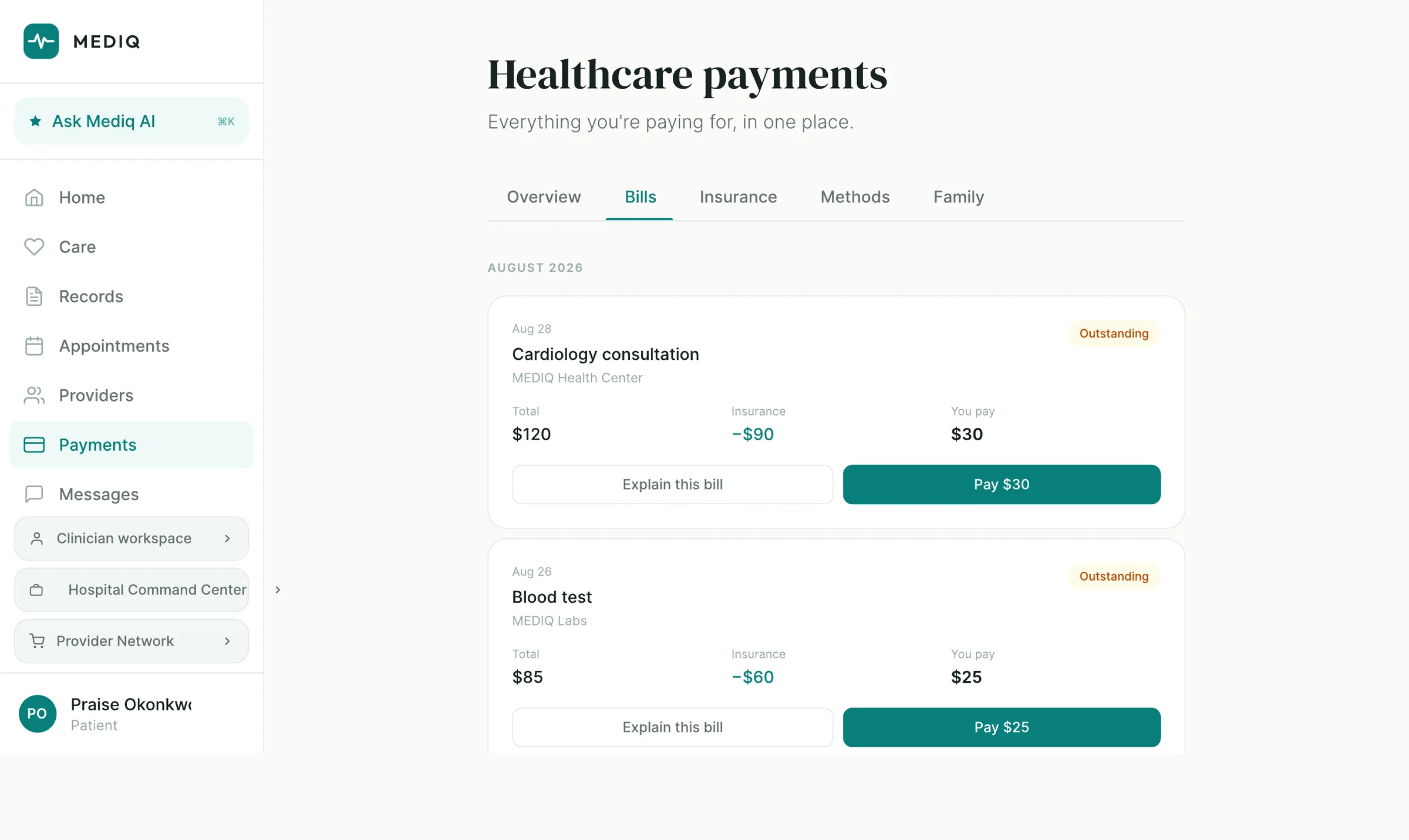
Money, with its arithmetic shown.
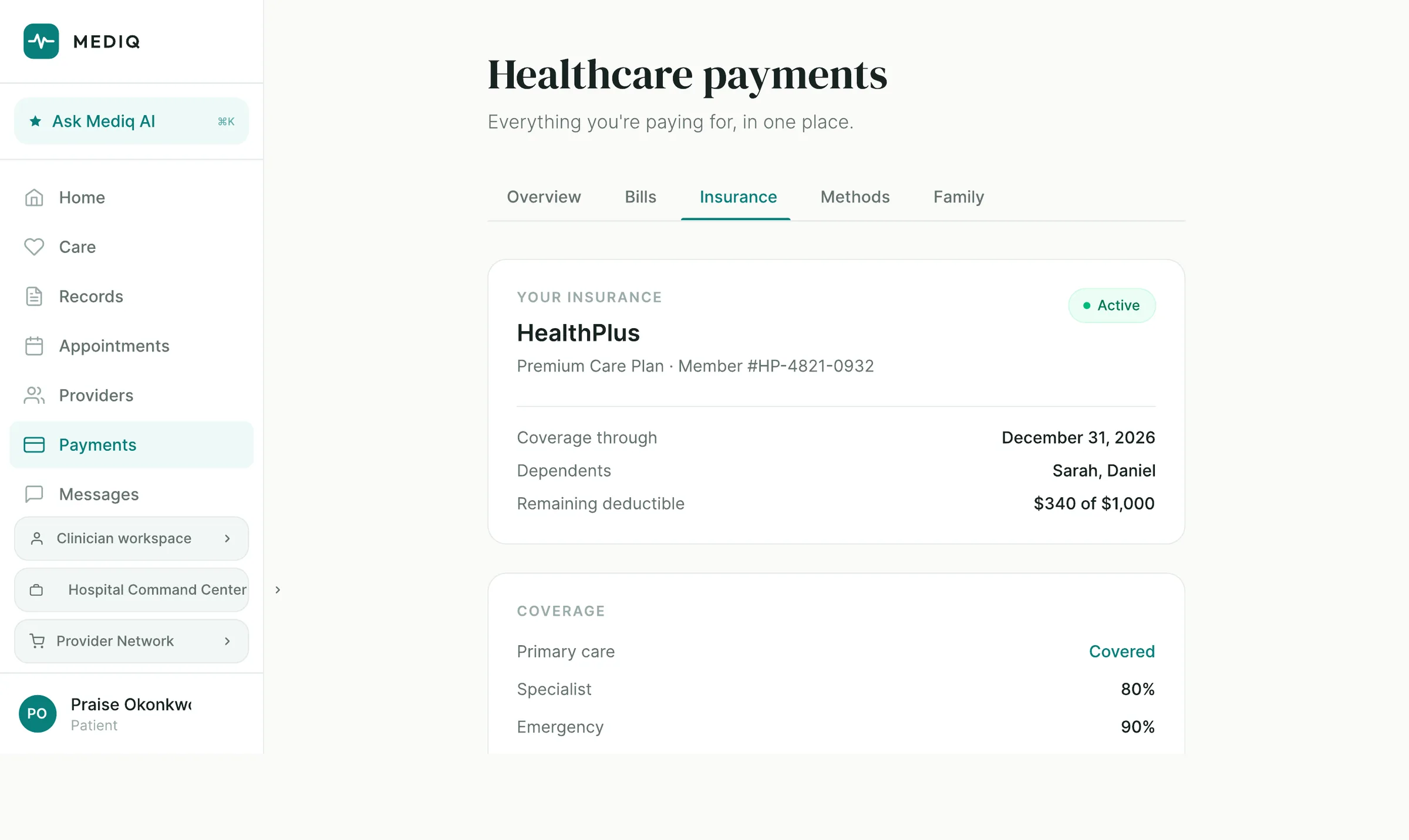
Healthcare billing loses people at the subtraction. MEDIQ prints it: total, what insurance covered, what you pay — on the same row, for every bill.
Beside the pay button is “Explain this bill”, because a charge you do not understand is a charge you do not pay. Insurance sits in the same place, as plain rows: what is covered, who is on the plan, how much of the deductible is left.
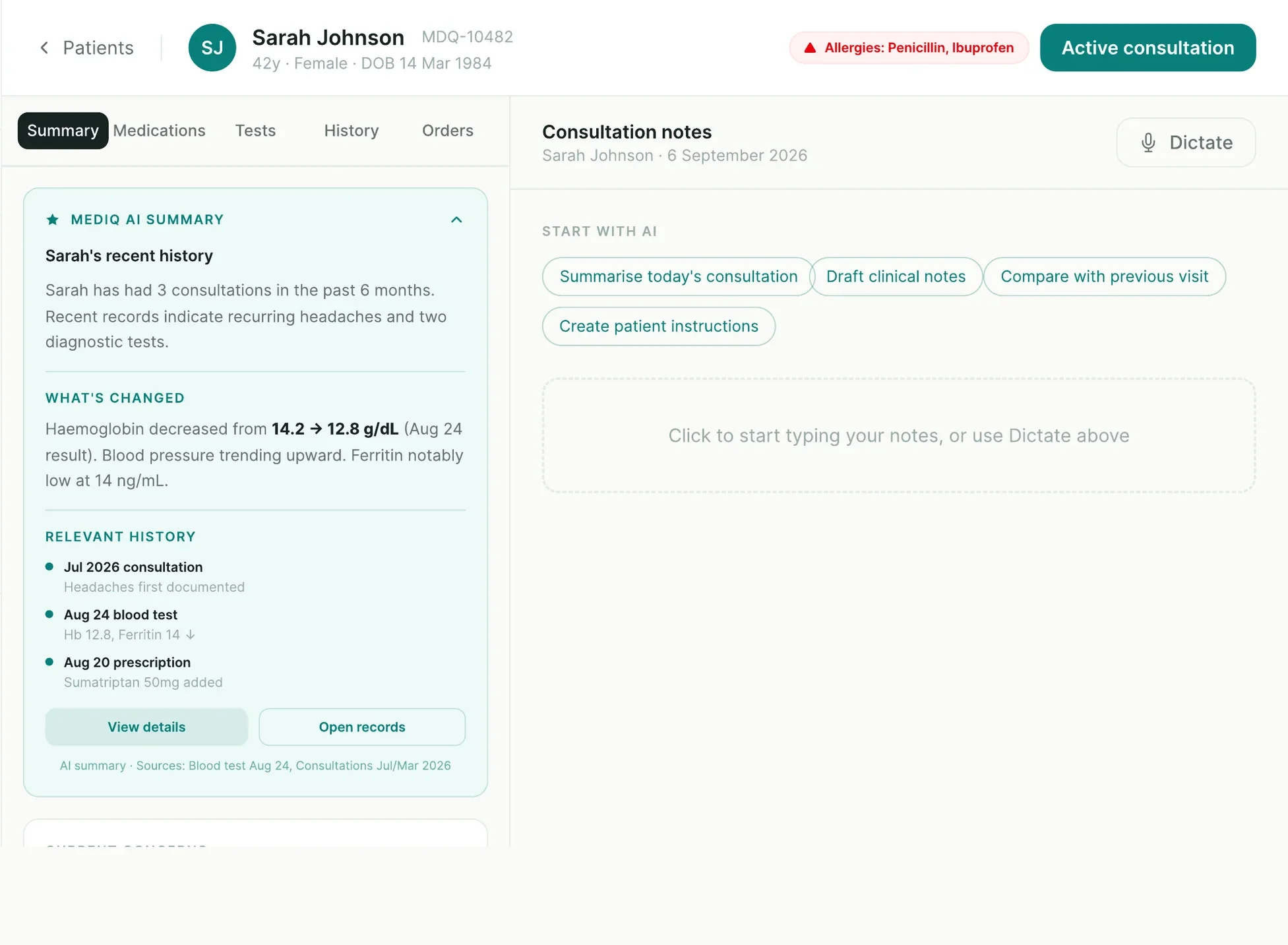
The file, already read.
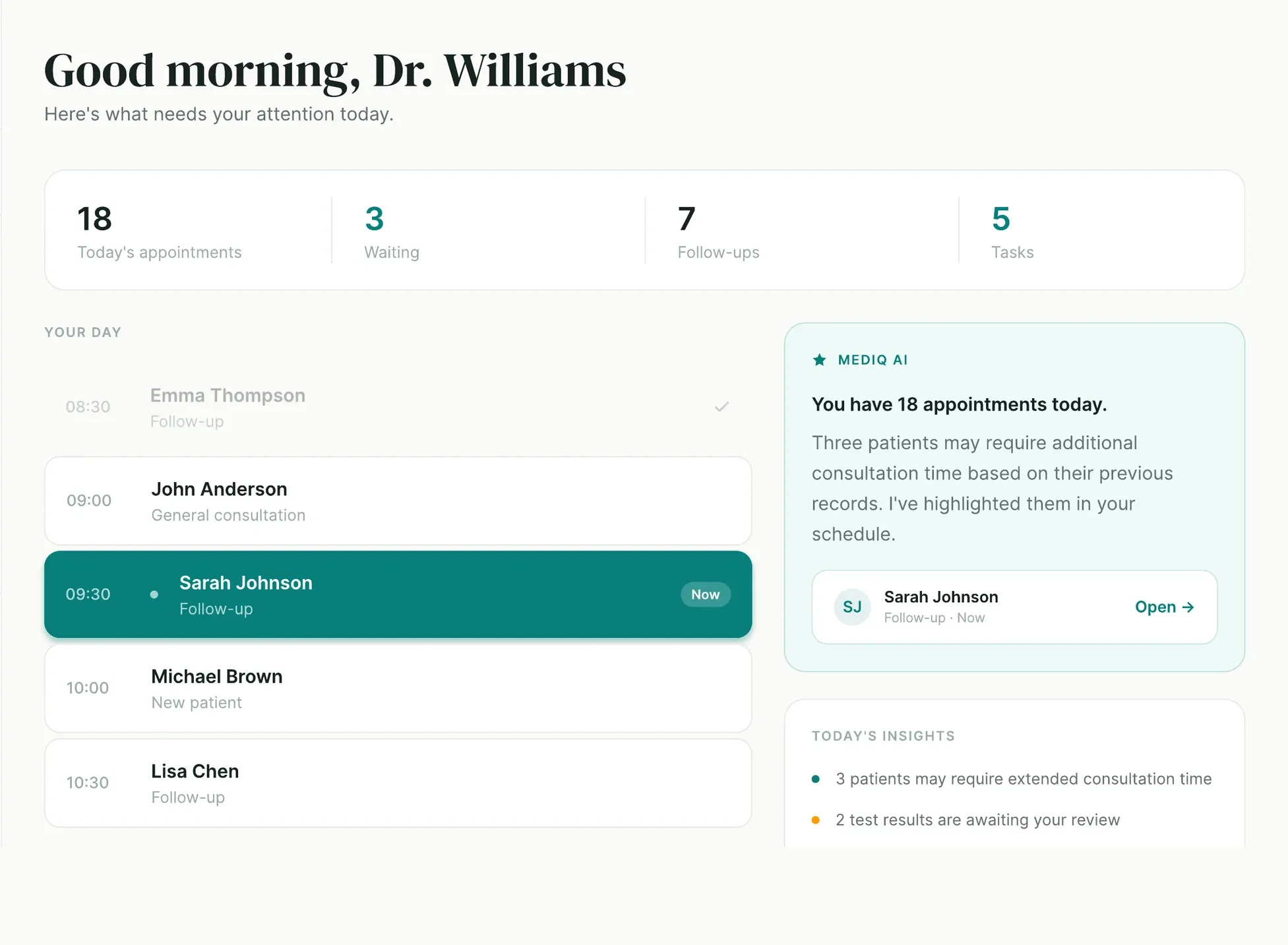
A clinician’s morning is a queue. The Today view puts the queue, the counts and the exceptions on one screen, and marks the consultation happening right now.
Open a patient and the brief is waiting: recent history, what has moved in their results, the consultations and prescriptions that bear on today — each with the record it came from named underneath. The notes pane sits alongside, with dictation and drafting one click away and the clinician still holding the pen.
- Allergies and active-consultation state pinned to the patient header
- AI summary sources cited inline — “Blood test Aug 24, Consultations Jul/Mar 2026”
- Drafting actions offered; nothing written to the record without confirmation
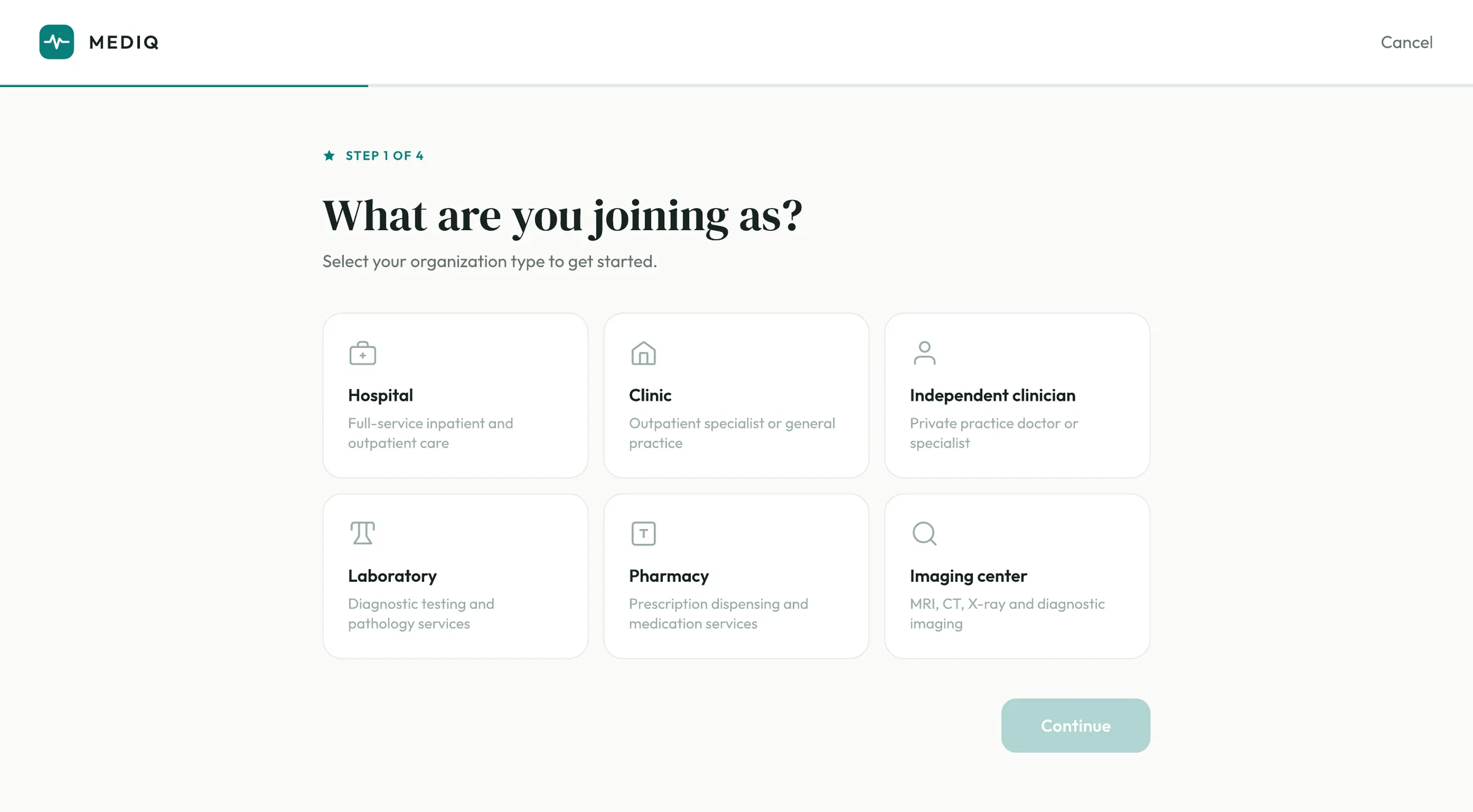
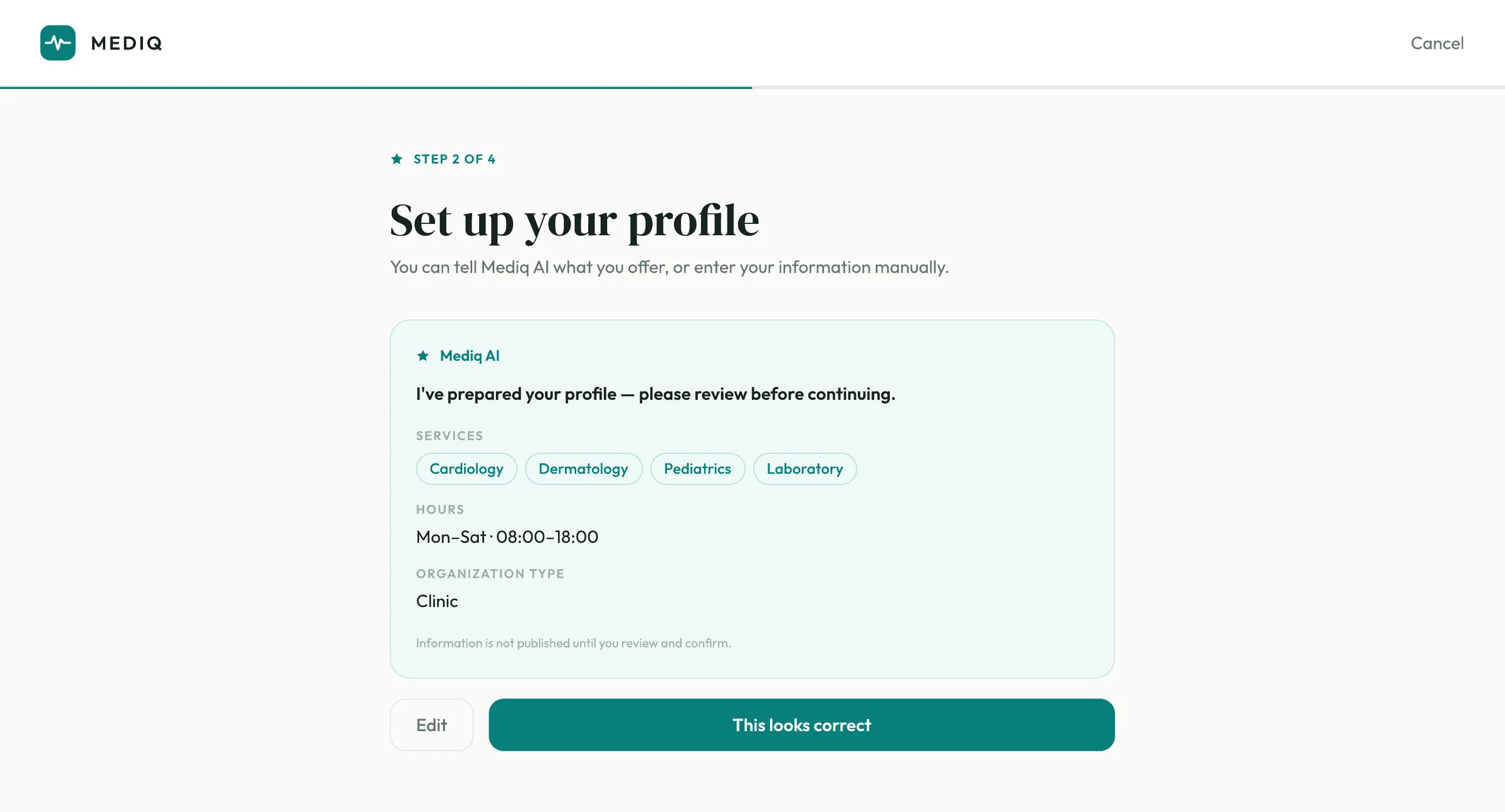
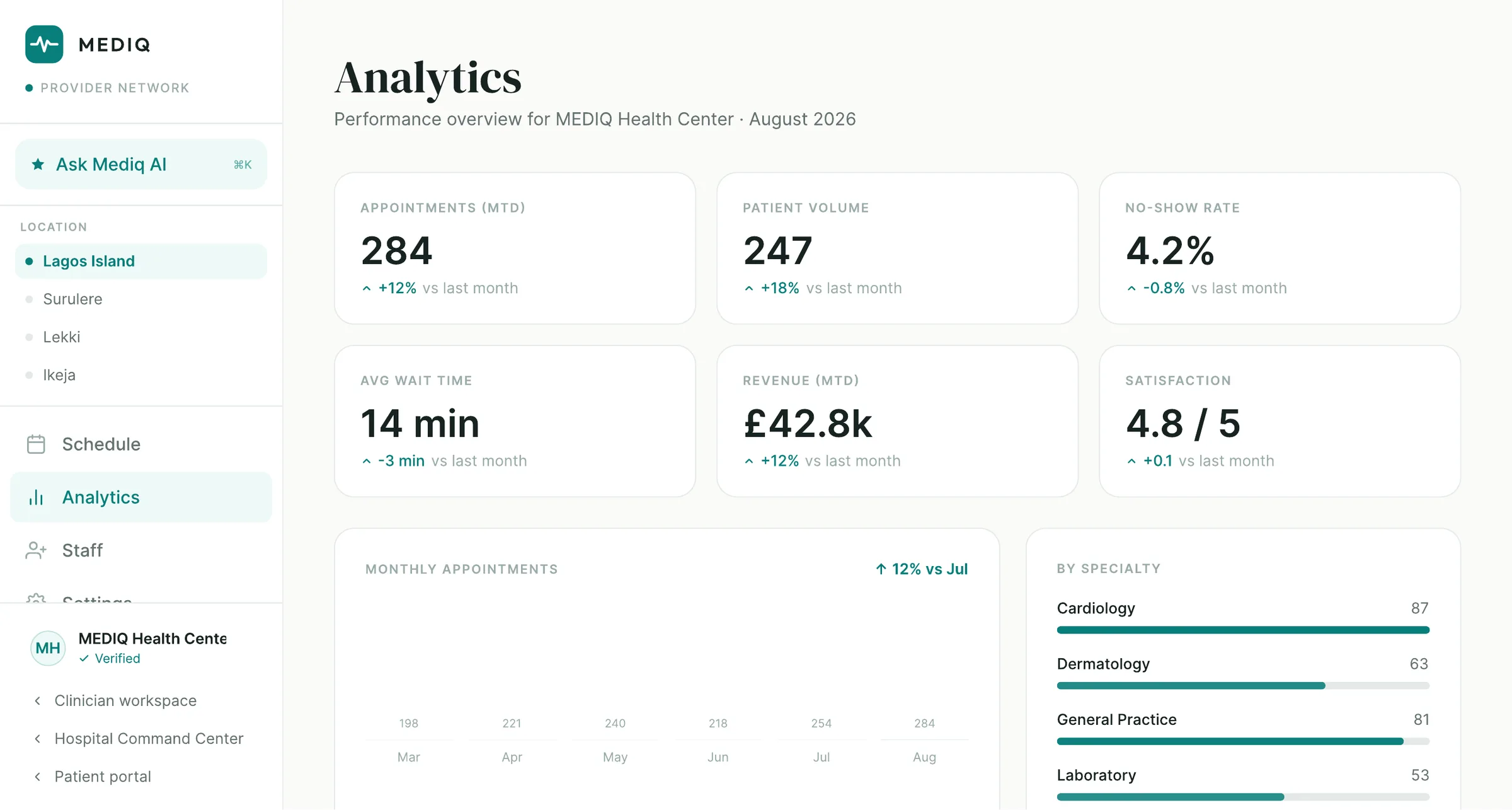
Four steps to join. Then something worth logging into.
Onboarding is where most healthcare platforms lose the supply side. MEDIQ asks one question per step and starts with the only one that changes everything downstream: what kind of organisation are you?
At step two the assistant has already drafted the profile — services, hours, organisation type — and the provider’s job is to check it rather than type it. Nothing goes live until they say it is right.
What they get on the other side is an operational view: appointments, volume, no-shows, wait time, revenue and satisfaction, per location, month over month.
Not a deck. A product you can open.
Product design system
Colour, type, spacing, components and the AI patterns, defined once and used across every surface.
Patient portal
Home, care journey, health record, appointments, providers, payments and messages.
Clinician workspace
Today, patients, schedule, messages, tasks, results and records, with the AI brief and notes pane.
Provider network
Four-step onboarding, AI-drafted profiles, staff, settings and per-location analytics.
Mediq AI patterns
Summaries, explanations, prompts and drafts — with sourcing and confirmation built into the pattern, not added to it.
Payments & insurance
Bills with their arithmetic, payment methods, family cover and plan detail.
Record architecture
One record, four readings of it, and explicit sharing — the model the whole product rests on.
Responsive build
A working web application, not a prototype: real navigation, real state, real screens.
Five decisions, in order.
- 01
Model the record first
Before a single screen, we settled what a health record is in this product and who may read which part of it. Every surface after that was a view onto that model.
- 02
Design the system once
One palette, one type scale, one card, one AI panel. Four products that look like one product because they are built from the same parts.
- 03
Put the intelligence where the work is
We placed the assistant inside each screen it was useful on, rather than behind a chat icon, and gave it the same rule everywhere: cite the source, wait for the confirmation.
- 04
Build the surfaces in parallel
Patient, clinician and provider were built against the shared system, so a change to a component landed in all three at once.
- 05
Ship it as a product
Real navigation between surfaces, real empty and loading states, real flows end to end — the version you could put in front of a clinic.
The rules the product never broke.
Plain language, always
If a sentence needs a medical dictionary, it is not finished. The product says what changed and what to do.
Show the source
Every AI summary names the records behind it. Trust in healthcare is not granted; it is evidenced.
Confirm before committing
The assistant drafts. A person publishes. There is no path where software writes to the record alone.
One record, four views
Not four products sharing a logo. The same history, read differently depending on who is looking.
Calm by default
Deep teal, soft mint and warm off-white. Colour is used to mean something — outstanding, flagged, now — never to decorate.
The next step is the interface
Whatever the screen, the most prominent thing on it should be the one thing worth doing next.
Four surfaces. One language.
A complete product, not a concept.
MEDIQ exists as a working system: four surfaces navigating between one another, a record architecture underneath them, an assistant present in every flow, and a design language consistent enough that a screen from the provider network and a screen from the patient portal are obviously the same product.
It is the kind of thing that usually takes a healthcare company a year and a department. It was designed and built by Creativnerd.
This is what a few days at Creativnerd looks like.
MEDIQ is one of ours. If you have a product in your head that deserves the same treatment, that is the conversation we like having.
See more of our workGot one of your own?
Tell the Concierge what you're building. It will tell you what it would take, and roughly what it would cost — before you speak to anyone.